A vulnerability scan false positive is a finding where the condition the scanner reported is not actually present on the asset. To close one, collect evidence that shows the condition is absent, such as a package version with a backport note, a configuration excerpt, a targeted manual check or a vendor statement, and record it on the finding along with who verified it, when, and for which assets. The verdict should survive the next scan, and it should come back for review when the check or the asset changes.
What a false positive actually is
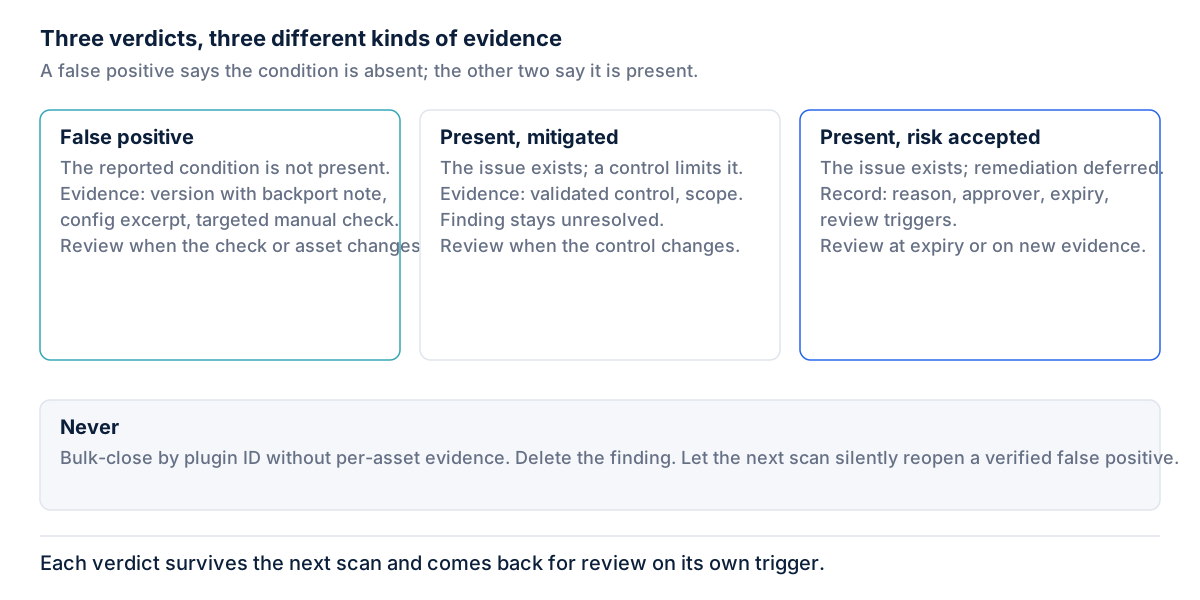
NIST SP 800-115 defines a false positive as “An alert that incorrectly indicates that a vulnerability is present.” The important word is present. A false-positive verdict disputes the observation itself.
That makes it different from two verdicts that often get filed under the same label. “Present but mitigated” means the vulnerable code is there and a compensating control reduces the risk. “Present but accepted” means the vulnerability is real and the organization has decided not to remediate it for now. NIST SP 800-40 Rev. 4 lists acceptance as a risk response, for example “relying on existing security controls to prevent vulnerability exploitation.” That is a risk decision, not a claim that the scanner was wrong. Filing it as a false positive hides real exposure and skips the review an acceptance needs. A rescan should not erase a risk decision covers how both kinds of verdict should be stored.
Common causes
NIST SP 800-115 is direct about the scale of the problem: vulnerability scanners “can have a high false positive error rate (i.e., reporting vulnerabilities when none exist).” The causes fall into a few patterns.
- Version-string detection versus backported fixes. The scanner reads a banner or package version and matches it against an affected range. Many distributions backport security fixes into older version numbers, so the version looks vulnerable while the fix is in place.
- Credential failures. When an authenticated scan cannot log in, or can log in but cannot read what it needs, the scan engine falls back to remote inference and produces partial results. Some of those inferences are wrong.
- Stale plugin logic. A check written before a vendor clarified the affected versions, or before a configuration-based fix existed, keeps firing until it is updated.
- Virtual patches masking the result. A web application firewall or IPS rule can block the probe or change the response, which confuses the check. This cuts both ways: the underlying code may still be vulnerable, which makes it a mitigation, not a false positive.
How to prove it
NIST SP 800-115 says scanner findings “often need to be validated to isolate false positives,” and notes that “Manual examination typically provides more accurate results than comparing results from multiple tools.” A second scanner can repeat the same mistake, so agreement between tools is weak evidence.
Good evidence answers one question: is the reported condition present on this asset? Useful forms include:
- Package version with a backport note. The installed package version, plus the distribution’s changelog or advisory entry showing that the specific CVE is fixed in that build.
- Configuration excerpt. The relevant setting showing that the vulnerable feature, module or protocol is disabled or not installed, captured from the asset itself.
- A targeted manual check. A safe, specific test of the condition, such as querying the exact file version or confirming the vulnerable endpoint does not exist, with the command and its output.
- Vendor advisory stating not affected. The supplier’s published statement that this product or version is not affected, with a reference to the exact text.
A note that says “patched” is not evidence. The proof has to come from the asset or the supplier, not from memory.
How to document it
A false-positive record should let someone who was not in the room understand the decision. At minimum it carries:
- The finding: the asset, the check, and the observation that triggered it.
- The evidence: the artifact itself, or a stable reference to it.
- Who verified it: the person who examined the evidence and made the call.
- The date: when the verdict was made.
- The scope: which assets the verdict covers. Ten hosts built from the same image may share a verdict, but only if the evidence shows they share the condition.
- The review trigger: what change should send the verdict back for review, such as an update to the check or a rebuild of the asset.
Why the verdict must survive the next scan
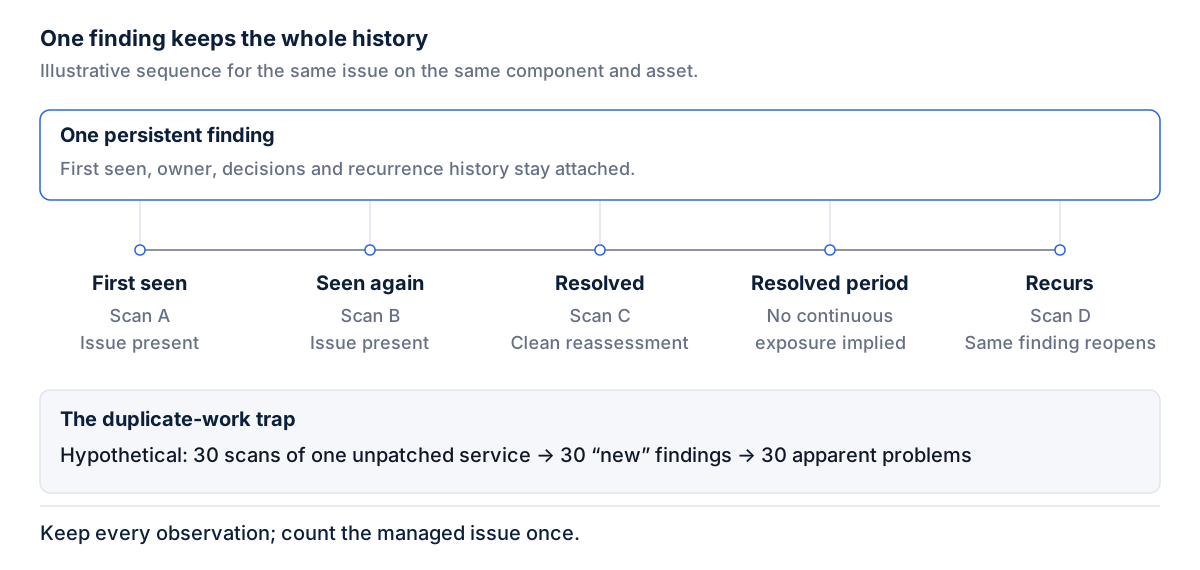
The scanner does not know what was decided. If the next scan reopens the finding as new, an analyst repeats finished work, and soon nobody records verdicts at all. The new observation should be attached to the existing finding and the verdict should stand.
That does not make it permanent. A false-positive verdict rests on two things: the check behaved incorrectly, and the asset did not have the condition. If the check changes, because the plugin logic was updated, the old reasoning may no longer apply. If the asset changes, because it was rebuilt, upgraded or replaced, the evidence describes a system that no longer exists. Either change should move the finding to review with the earlier verdict visible, not silently reset it to open and not leave it closed by inertia.
The audit angle
An auditor should be able to read the record and reproduce the reasoning: here is what the scanner reported, here is the evidence that the condition is absent, here is who checked and when. If reproducing the decision requires asking the analyst, the record is incomplete. CIS Controls v8.1, Control 7 asks for a documented, risk-based remediation process (Safeguard 7.2) and for both authenticated and unauthenticated scans (Safeguard 7.5). False-positive verdicts are where an auditor will look for shortcuts.
What not to do
- Bulk-closing by plugin ID. A check may misfire on one operating system build and be accurate on another. Closing every instance of a plugin across the estate without per-asset evidence turns a verdict about one system into an assumption about all of them.
- Deleting the finding. Deletion removes the observation, the evidence and the history. The next scan recreates it with no context, and an auditor sees nothing.
- Using “false positive” as a convenience label for findings that are real but mitigated, accepted or not a priority.
In practice
- Pick five findings marked as false positives. Can you find the evidence for each one without asking the person who closed it?
- Check whether any false-positive verdict was applied by plugin ID across many assets. Does the evidence cover every asset in scope?
- Look for false positives that are really mitigations or acceptances, and move them to the right verdict with an approver and expiry.
- Confirm that a plugin update or an asset rebuild sends the affected verdicts to review.
- Sectie’s Exposure & Vulnerability Management product keeps a false-positive verdict next to the finding with who decided it and when, and a later scan never silently overrides it.